The Simple Timer App does exactly what it says. It displays a clear and easy to read countdown timer. Perfect for meetings, events, presentations, classrooms, gyms, or any workspace where time based visuals matter.
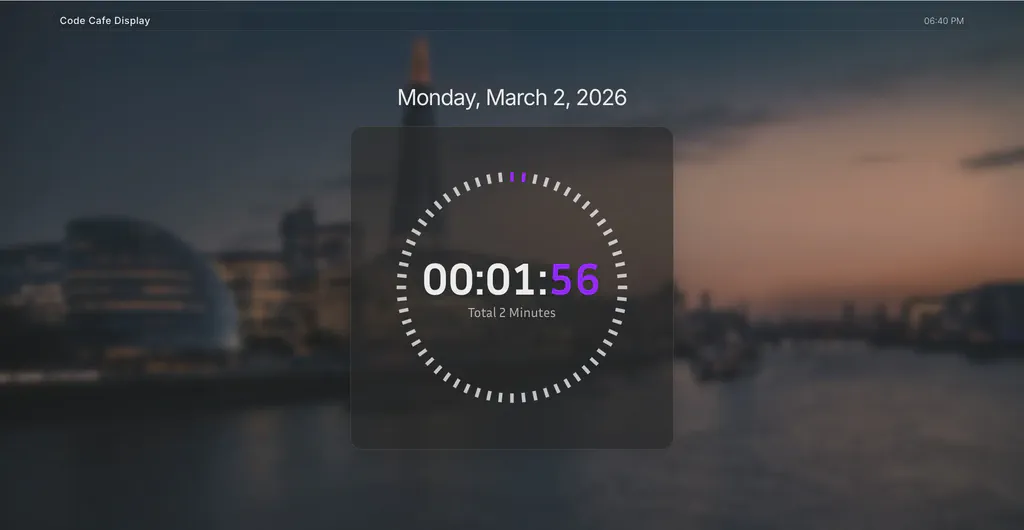
Clean and Focused Countdown
The Simple Timer App is built for clarity. With a minimal design and no extra text, it keeps attention on what matters most, the time remaining. Perfect for situations where the purpose of the countdown is already clear to your audience.
Click the button below to use the Screenly Simple Timer App now.
Simple and Straightforward
Quick to set up and easy to use, this timer works seamlessly across your screens, making it a reliable choice for everyday countdown needs.
Work across timezones
The Screenly Simple Timer App works seamlessly for international deployments. The Countdown Timer will operate off of the local time zone for the individual screen, and users can also override the timezone to have it work with a particular desired timezone.
Boost focus and motivation
Whether you’re running sprints in a workshop, timing a presentation segment, or tracking exercise intervals, a visible timer keeps everyone aligned and on schedule.
Run anywhere
The Simple Timer App can be deployed on screens via a browser with Screnly Anywhere or digital signage player, no complex setup required. Perfect for teams, classrooms, events, or personal productivity displays.
Getting started
To get started with the Screenly Simple Timer App, the first step is to get a 14-day free trial account with Screenly. With our 14-day free trial, you can see inside Screenly and determine if the platform makes sense for you.
With Screenly Anywhere, you can launch and display the Screenly Simple Timer App on a web browser without any additional hardware.
That’s all for now. If you have any questions, we are always happy to help. Reach out to Screenly Support anytime, and we’ll get in touch with you as soon as possible.
