
We’ve been busy making your Screenly experience smoother, more reliable, and easier to manage. This update is packed with improvements, from better screen control to audio that just works. Here’s what’s new.
Custom resolution and rotation for every screen
You can now set a specific resolution and rotation for each individual screen directly from your Screenly account. Whether you’re running a portrait menu board or a landscape lobby display, you’re in full control.
Your settings follow the screen itself. If you unplug a monitor and move it to a different port or a different player, it remembers its configuration. No need to set it up again.
If you manage multiple screens in different orientations and sizes, you no longer have to worry about settings getting lost or needing to be reconfigured whenever something gets moved around.
Seamless audio output switching
You can now switch audio between HDMI and the headphone jack directly from your settings, with changes taking effect immediately. No restarting the player, no power-cycling, no waiting.
This makes it much easier to adapt your setup for different rooms or events without any disruption to your display.
Improved 3.5mm audio output on Player Max
Player Max users can now enjoy reliable analog audio through the 3.5mm jack. We’ve improved audio routing so that selecting the headphone output correctly delivers sound there, giving you full flexibility over how audio is handled on your setup. Combined with the seamless audio switching above, Player Max users now have complete control over their audio output.
Accurate wired connection status on the setup screen
The setup screen now correctly reflects whether your Ethernet connection is active. Previously, the wired status could appear connected even with the cable unplugged, as long as Wi-Fi was up.
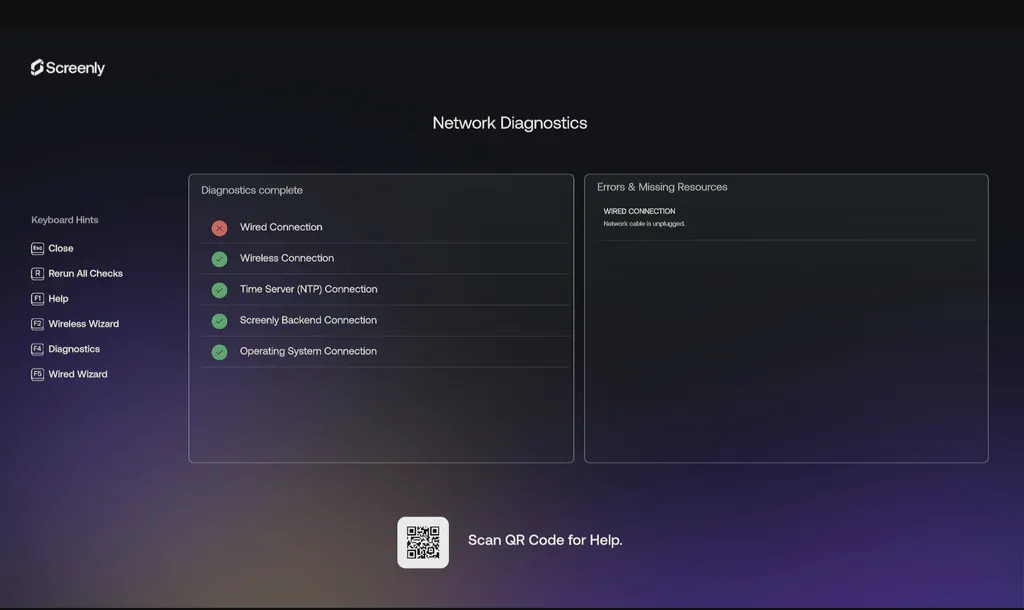
When setting up or troubleshooting a player, you need to trust what’s on the screen. The connection status you see now matches what’s actually plugged in.
Clearer Wi-Fi setup guidance with “Wireless Wizard”
The keyboard shortcut for connecting to Wi-Fi is now consistently labeled “Wireless Wizard” across both the setup and diagnostics screens, replacing the less descriptive “F2” label.
This makes the setup process more intuitive, especially for first-time users.
That’s a wrap on 26.6.0. As always, these updates roll out automatically, so you don’t need to do anything to get them. If you have questions or run into anything unexpected, our support team is here to help.