
Screenly players can now connect to 802.1x authenticated networks. This covers both Wi-Fi and wired ethernet connections, including configurations with static IPs. You set it up directly through the on-screen wizard on the player itself.
What 802.1x is and why it matters
802.1x is a network access control standard that requires devices to authenticate before they are allowed onto the network. Instead of a shared password, each device (or user) presents credentials that the network validates against a RADIUS server. Access is granted or denied at that point.
It is widely used in environments where controlling exactly what is on the network matters: corporate offices, hospitals, universities, and manufacturing facilities. If your organization’s IT policy requires 802.1x, every device on that network has to support it, no exceptions.
Until now, that requirement effectively excluded Screenly players from those networks. You could work around it with a separate VLAN or a dedicated unmanaged switch, but those are workarounds that create their own overhead. This update removes the need for them.
Where this is most relevant
If you are deploying signage in any of the following environments, this is for you.
Enterprise offices that use 802.1x to segment and control network access. Screenly players can now join the corporate network directly, the same way a managed laptop or printer would.
Hospitals and healthcare facilities where network segmentation is part of compliance requirements. Getting a device onto the right network without an exception or a workaround matters here.
Universities and campuses with managed Wi-Fi networks. Many campus networks require 802.1x for all connected devices. Screenly players can now meet that requirement out of the box.
Manufacturing and industrial environments where both wired and wireless networks are tightly controlled. The Wired Wizard supports 802.1x authentication alongside static IP configuration, which is a common combination in these settings.
What is supported
The Wireless Wizard and Wired Wizard both support 802.1x PEAP authentication. Here is a breakdown of what each covers.
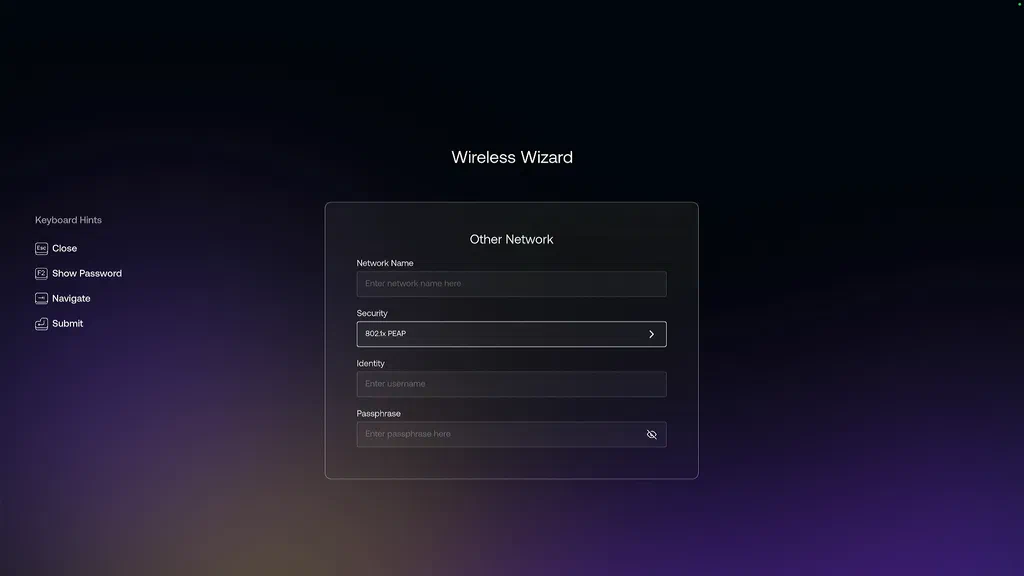
Wireless: You can connect to a Wi-Fi network using 802.1x PEAP by entering your network name, identity (username), and passphrase. The security type is selectable from the wizard, alongside WPA/WPA2 Personal and WEP.
Wired (DHCP): If your wired network assigns IP addresses automatically, you can enable 802.1x PEAP authentication on top of that. Enter your identity and password, and the player authenticates before it is granted access.
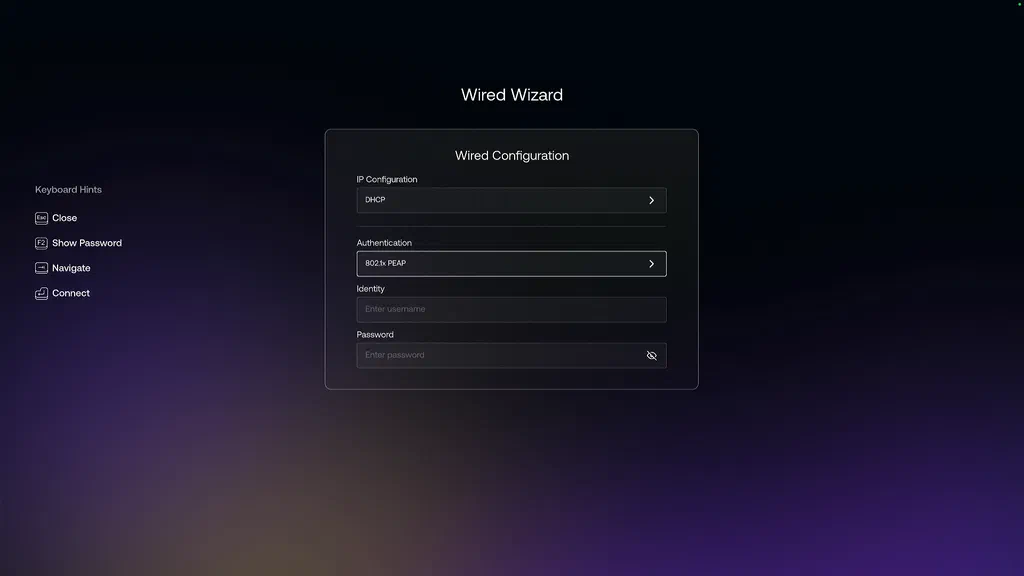
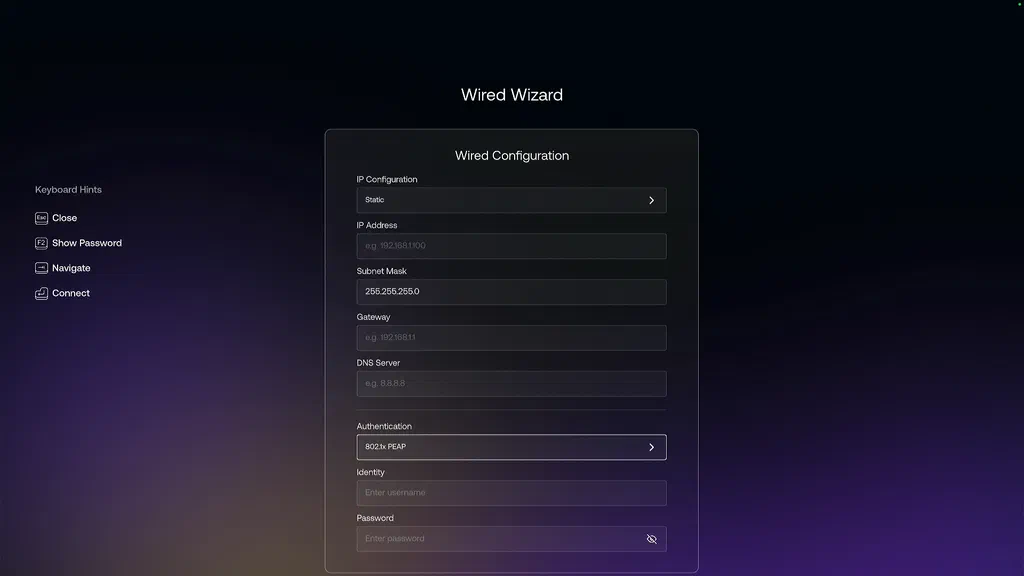
Wired (Static IP): For environments that require a fixed IP address alongside 802.1x, both are configured from the same screen. You set the IP address, subnet mask, gateway, and DNS server, then configure authentication in the same form before connecting.
How to set it up
Everything is accessible through the on-device wizards. Press F2 for the Wireless Wizard or F5 for the Wired Wizard from the help screen on any Screenly player.
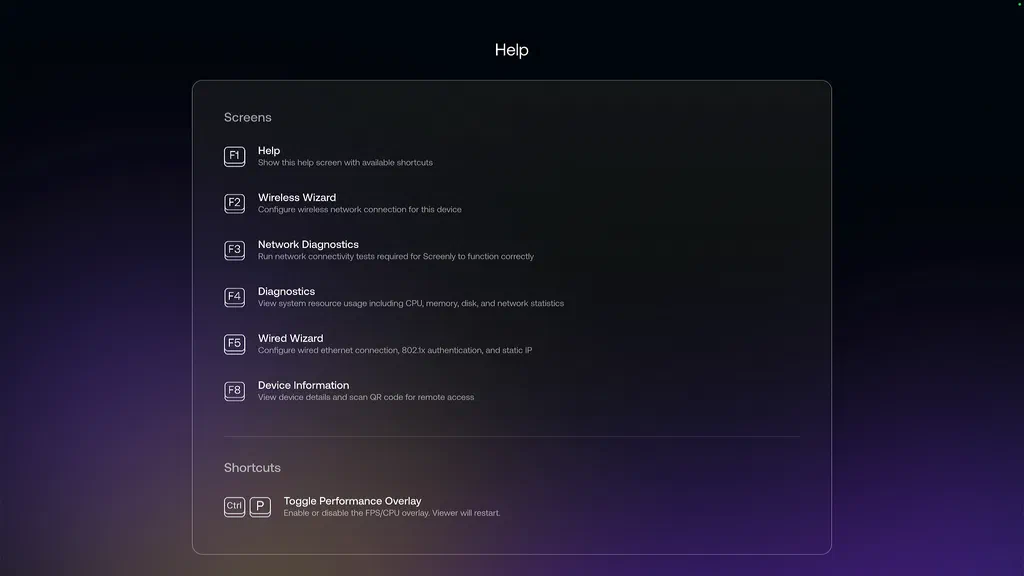
The keyboard hint list on the left side of each screen shows the available actions as you navigate through the form.
For wireless connections, select 802.1x PEAP from the Security field, then enter your identity and passphrase.
For wired connections, choose your IP configuration (DHCP or Static), then select 802.1x PEAP under Authentication and enter your credentials.
A full list of available screens is accessible by pressing F1 from any player. Network Diagnostics (F3) is useful for verifying connectivity after setup.
A note on PEAP
PEAP (Protected Extensible Authentication Protocol) is the most widely deployed form of 802.1x in enterprise Wi-Fi and wired environments. It wraps the authentication exchange in a TLS tunnel, so credentials are protected in transit. If your network uses a different EAP type, reach out to support and let us know.
The broader picture
This is part of a continued focus on making Screenly players fit into real enterprise network environments without requiring workarounds or exceptions. The Tailscale integration we shipped earlier this month addressed the problem of reaching private internal resources from a player. 802.1x support addresses the problem of getting the player onto the network in the first place.
Together, they cover a large portion of the deployment scenarios where network constraints have historically been a friction point.
If you have been holding off on a deployment because of 802.1x requirements, give this a try. If you run into anything, reach out to support.