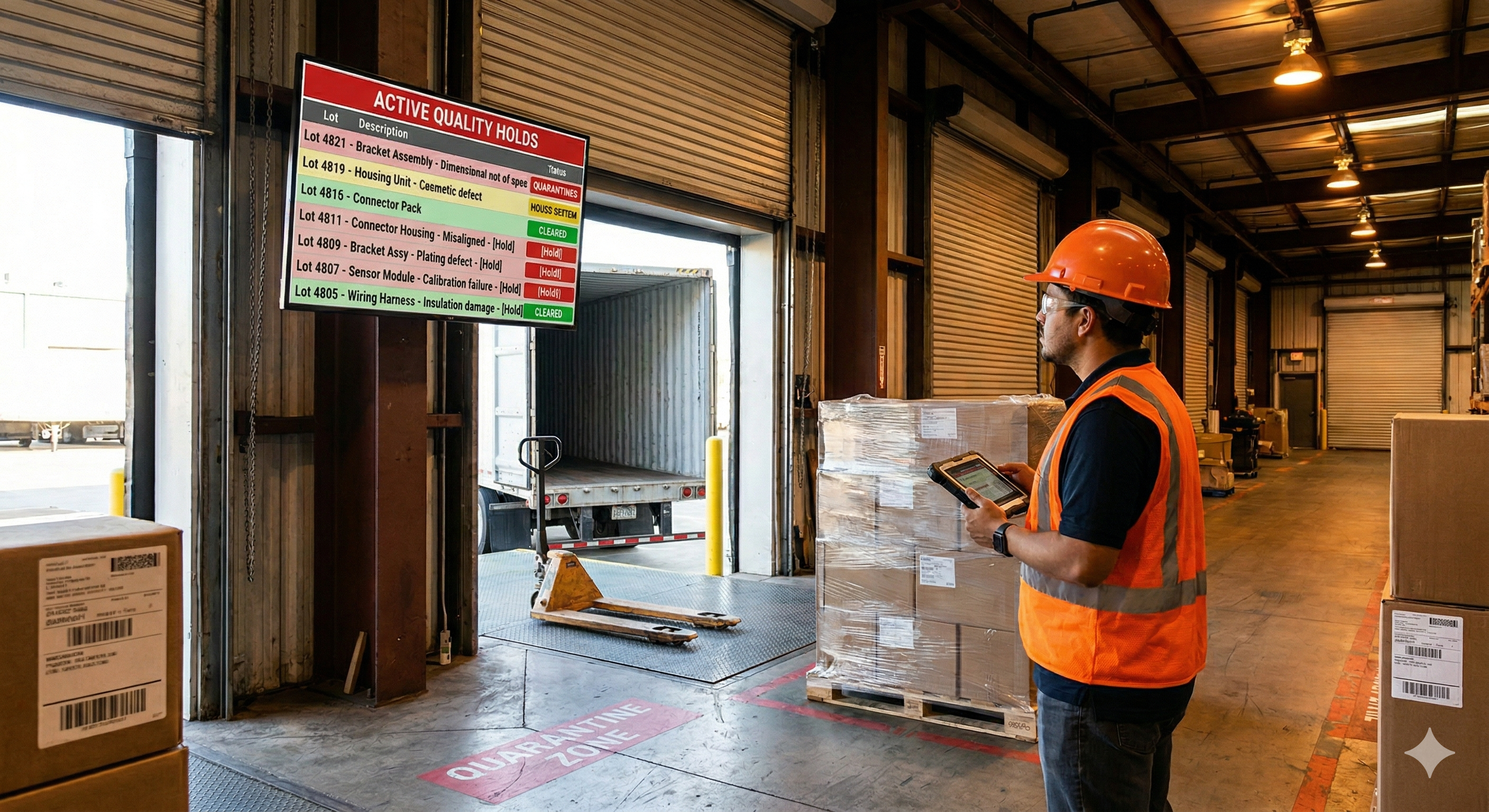
A quality hold is supposed to be simple. Someone flags a lot, the lot stays put until the Material Review Board makes a disposition decision, and nothing moves until the paperwork says it can. In theory, the system works. In practice, the gap between the quality management system and the shipping dock is where things fall apart.
The non-conformance report lives in one system. The shipping schedule lives in another. The dock crew is working off a pick list that was generated before the hold was placed. And by the time anyone realizes the mistake, a pallet of quarantined product is already on a truck headed to a customer who will eventually send it back, along with a chargeback and a note to the supplier quality team.
Digital signage is helping manufacturers stop held product from shipping by accident. By putting live quality hold status on screens at docks, inspection stations, and staging areas, plants create a visual barrier that no pick list can override. This is how it works, and why more quality teams are making it a standard part of their non-conformance process.
The real problem with quality holds
The hold itself isn’t the hard part. Most QMS platforms handle the administrative side well. An inspector opens a non-conformance report, logs the affected lot, and assigns a disposition path. The lot might be flagged for rework, use-as-is review, return to supplier, or scrap. The Material Review Board convenes, reviews the data, and makes a call. On paper, it’s a closed loop.
The hard part is what happens on the floor while the loop is still open. The physical product sits in a warehouse or staging area, and the only thing separating it from shippable inventory might be a paper tag, a cone, or a handwritten note on a whiteboard. These signals are easy to miss, easy to move, and easy to ignore when a dock worker is trying to hit a loading deadline.
Manufacturing quality teams are using digital signage to close the gap between the QMS and the shipping dock. The reason this gap persists isn’t carelessness. It’s a systems problem. The QMS is an administrative tool designed for quality engineers. The dock is an operational environment where people work from scanners, pick lists, and verbal instructions. These two worlds rarely talk to each other in real time, and the result is a class of errors that no amount of training or discipline can fully prevent.
What a quality escape actually costs
When held product ships, the consequences extend far beyond the cost of the product itself. The immediate hit is usually a chargeback from the customer, often accompanied by a formal complaint routed through the supplier quality team. In automotive and aerospace supply chains, a single escaped lot can trigger a corrective action request that requires weeks of engineering time to close.
A single shipped quality hold can mean a five-figure chargeback and a supplier scorecard hit that lingers for a year. The scorecard impact is particularly damaging. Major OEMs and tier-one customers maintain rolling supplier performance metrics that weight quality events heavily. A single escape can drop a supplier from “preferred” to “conditional” status, which means more incoming inspections on the customer’s end, reduced order volumes, and in some cases, loss of future program bids.
The internal costs are substantial, too. Every escape triggers a root cause investigation, a corrective action plan, and often a full lot trace to determine whether other affected product has already shipped. In regulated industries like aerospace and medical devices, the documentation burden alone can consume hundreds of hours.
And then there’s the cost that’s hardest to quantify: trust. A quality escape tells your customer that your internal controls have a gap. Rebuilding credibility with a customer quality team after a shipped hold takes far longer than preventing the escape in the first place.
Why paper tags and whiteboards fail
The traditional approach to marking held product is physical. A red tag gets attached to the lot. A quarantine area is roped off. Someone writes the hold information on a whiteboard near the dock. These methods have been standard for decades, and they share a common weakness: they depend entirely on someone seeing them and acting on that information at the right moment.
Paper tags fall off. They get covered by shrink wrap. They fade after a few days in a warehouse with temperature swings. A dock worker loading a trailer at the end of a shift isn’t going to inspect every tag on every pallet when the truck needs to leave in twenty minutes.
Whiteboards are better, but only slightly. They require someone to update them manually every time a hold is placed or cleared. If the quality engineer who placed the hold is on a different shift than the dock supervisor who needs to know about it, the whiteboard might not get updated until the next day. By then, the lot could already be staged for shipment.
The fundamental issue is that these physical signals exist outside the flow of work. The dock crew’s workflow is driven by the warehouse management system or the ERP pick list. If the hold isn’t reflected in those systems, the physical tag is the only line of defense.
How digital hold boards change the equation
A digital quality hold board is a screen mounted at the point where shipping decisions happen. It displays, in real time, every lot currently under hold, the reason for the hold, the disposition status, and whether the lot has been cleared for release. The information comes directly from the QMS or ERP system, so it updates automatically whenever a hold is placed or resolved.
This changes the dynamic in several important ways. First, the hold status is impossible to miss. A 55-inch screen mounted at the dock door showing a red-highlighted lot number is a fundamentally different signal than a paper tag buried on a pallet three rows back in the warehouse.
Second, the display is always current. There’s no lag between when the quality team places a hold and when the dock sees it. The moment an NCR is opened and a lot is flagged in the QMS, the screen updates. This eliminates the shift-to-shift communication gap that causes most accidental shipments of held product.
Third, the screen serves as a shared reference point. When a dock supervisor has a question about whether a lot is clear to ship, they look at the board. This reduces friction, speeds up legitimate releases, and creates a culture where checking hold status is a natural part of the shipping workflow rather than an extra step.
Where to mount hold boards for maximum effect
Placement matters as much as the data on the screen. A hold board tucked in a corner of the quality office isn’t solving the problem. The screens need to be where the decisions are made and where the product physically moves.
The most effective locations are outbound dock doors, where loaders stage product for shipment and where a visible hold list can prompt a final check before product goes on a truck. Inspection and receiving stations are also high-value placements, especially for inbound quality holds on supplier material that needs to be quarantined before it enters production.
Staging areas near the warehouse are another strong placement. When product is pulled from storage and staged for a shipment, a screen in the staging area gives the picker an immediate visual check against the hold list. Some plants also mount screens in the MRB area itself, giving the review board a live view of all open holds and their current disposition status during meetings.
Going beyond holds with non-conformance visibility
Quality hold boards are the highest-priority use case, but the same infrastructure supports a broader set of quality visibility needs. Once you have screens connected to your quality data, you can display trending non-conformance data by category, supplier, or product line. This gives floor supervisors early warning when a particular material or process is generating more issues than usual.
You can also show corrective action status. Open CAPAs with approaching deadlines can be displayed on screens in the quality department, keeping response times tight and making overdue items visible to the broader team. In plants where supplier quality is a constant focus, screens can display incoming material disposition rates, highlighting which suppliers have the highest rejection rates and which lots are currently waiting for inspection.
This kind of ambient quality data changes the culture around non-conformance management. When everyone on the floor can see that a particular component has triggered three NCRs in the last week, conversations happen earlier. Operators who might not have access to the QMS directly still get the signal that something is off, and they can flag issues faster.
Build custom quality displays with Screenly Edge Apps
Screenly Edge Apps is a developer framework that lets your engineering or IT team build custom digital signage applications using standard web technologies. For quality hold boards, this means you can create displays that pull data directly from the systems your plant already runs on.
If your quality management is handled in Arena by PTC, Edge Apps can connect to Arena’s API to pull active non-conformance records and display them on screen with lot numbers, hold reasons, and disposition status. Plants running SAP QM can pull quality notification data in real time, mapping notification types to visual hold indicators on the dock board. For teams using other QMS or ERP platforms, Edge Apps works with any system that exposes data through an API or a database connection, including custom-built MES platforms and homegrown quality tracking tools.
The flexibility matters because no two plants structure their quality data the same way. Edge Apps lets your team design the exact layout and logic that matches your workflow, from color-coded severity indicators to automatic escalation alerts when a hold has been open longer than a threshold you define.
Edge Apps run locally on the Screenly Player, so they’re fast and reliable even if your internet connection drops. Screenly handles device management, security, and over-the-air updates, so your developers can focus on the application logic. And because Edge Apps are built with HTML, CSS, and JavaScript, any web developer on your team can build and maintain them without learning a proprietary platform.
Screenly’s open-source Playground on GitHub has example Edge Apps you can use as starting points, including data table templates you can customize to pull from your QMS with conditional formatting that highlights lots based on hold status and aging.
Connecting the screen to your quality system
The technical path from your QMS to a screen on the dock is simpler than most quality teams expect. Your QMS or ERP is the source of truth. When an inspector opens a non-conformance report and assigns a lot to hold status, that record exists in the system. If your system has an API, which Arena by PTC, SAP QM, and most modern QMS platforms do, your Edge App can query it on a schedule, pulling the current list of active holds every thirty seconds or every minute. The screen always shows the latest state without anyone needing to push an update.
For older systems that don’t expose an API, a lightweight middleware layer can bridge the gap. A simple script that queries a database view and publishes the results to a format your Edge App can consume is often all it takes. Authentication and security are handled at the Edge App level, and because the Edge App runs on the Screenly Player behind your plant’s firewall, the data never leaves your network.
What a rollout looks like in practice
Getting from concept to live hold boards on the dock typically takes days rather than months. The process starts with identifying your highest-risk location, which is usually the primary outbound dock where the most shipments leave each day.
Mount a commercial-grade screen at the dock. Connect a Screenly Player. Point it at your quality hold display, whether that’s a custom Edge App pulling from your QMS or a browser-based dashboard you already maintain. From the moment the screen goes live, every dock worker, supervisor, and quality engineer who walks past it sees the current hold status without lifting a finger.
From there, you can expand. Add screens at receiving for inbound material holds. Add a board in the MRB room that shows disposition aging. Add a screen near the quarantine area that displays the physical location of held lots. Each screen is managed remotely through Screenly’s cloud dashboard, so your IT team can push new Edge App versions and monitor screen health across every location from a single interface.
The rollout scales naturally because each Screenly Player is a self-contained unit that connects to your network and pulls its content. Adding a new screen to a new location is a matter of mounting hardware and assigning it a playlist in the dashboard.
Making hold boards part of the quality system
The most effective implementations treat the hold board not as a standalone display, but as an integrated part of the non-conformance process. When a new hold is placed, the screen updates automatically. When the MRB clears a lot, it disappears from the board. There’s no manual step, no room for someone to forget to update the whiteboard, and no lag between the system of record and the visual signal on the floor.
Over time, this integration creates a feedback loop that improves quality culture. Operators see that holds are taken seriously because they’re visible to everyone. Dock supervisors develop a habit of checking the board before every shipment. Quality engineers gain confidence that their holds are actually being enforced, which makes them more likely to place holds proactively when they spot a potential issue rather than hoping the product will pass final inspection.
Ready to close the gap between your QMS and your dock?
If quality holds are part of your operation, the question isn’t whether you need better visibility. It’s how quickly you can get it. Download the free 2026-27 Digital Signage Readiness Checklist to find out what you need to connect your quality data to the floor and how fast you can go live.