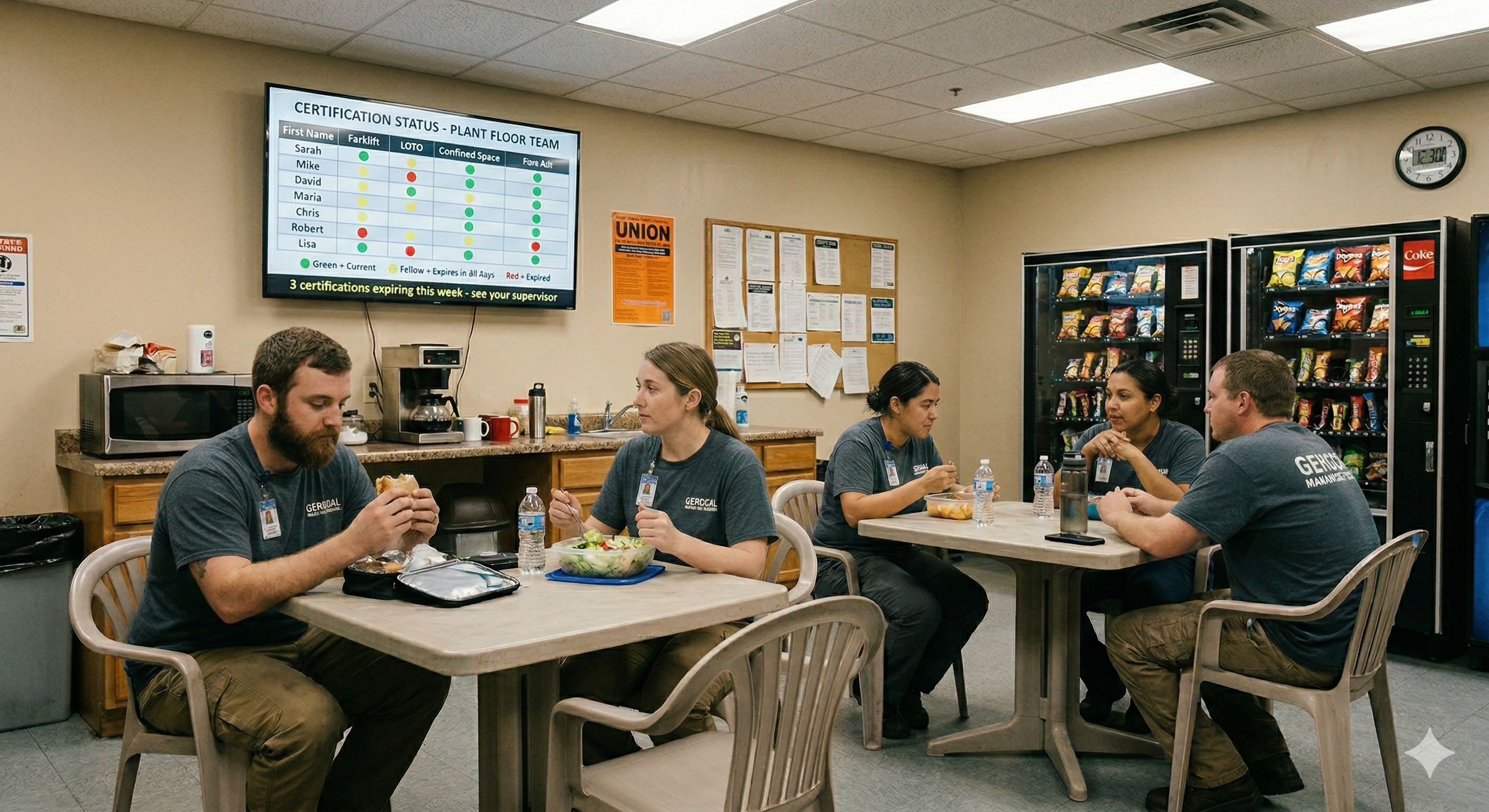
Every manufacturing plant has a version of the same problem. Somewhere in the EHS office or on a shared drive, there’s a spreadsheet tracking who is certified to do what. Forklift operators, confined space entrants, lockout/tagout authorized personnel, hazmat handlers. The spreadsheet might be meticulously maintained or it might be three months behind. Either way, the people who need to know about expiring certifications almost never see it.
That’s how plants end up with operators running equipment on lapsed credentials, supervisors approving confined space entries without realizing a team member’s permit certification expired two weeks ago, and audit findings that could have been prevented with a little more visibility.
Digital signage is helping manufacturing plants stay ahead of certification lapses before auditors find them. By putting training status, upcoming deadlines, and compliance gaps on screens in break rooms, near time clocks, and along main walkways, plants are turning compliance from something that lives in a back-office file into something the entire workforce sees every day.
The hidden cost of spreadsheet-based tracking
Most plants track certifications through some combination of spreadsheets, learning management systems, and paper files. These tools do the job of recording who completed what training and when it expires. What they don’t do is make that information visible to the people who need it most.
A safety manager might run a report once a month and flag upcoming expirations. But between reports, things slip. A forklift operator’s three-year certification quietly expires. A new hire completes classroom training but hasn’t finished the hands-on evaluation. A lockout/tagout refresher that was due in March gets pushed to April, then May, then forgotten entirely.
The consequences are real. Under OSHA standards, employers are responsible for ensuring that workers performing hazardous tasks hold current, valid certifications. Forklift operators must be evaluated at least every three years under 29 CFR 1910.178. Lockout/tagout training must be provided whenever there is a change in job assignments, equipment, or processes that present new hazards, and periodic inspections of energy control procedures are required at least annually. Confined space entry requires that all entrants, attendants, and supervisors be trained before their first entry and whenever the employer has reason to believe the training is inadequate.
When an OSHA inspector walks through a facility and finds an operator working with an expired certification, the citation doesn’t care that the spreadsheet was going to be updated next week. Serious violations can carry penalties of up to $16,550 per instance, and willful or repeated violations can reach $165,514. For a plant with dozens of certified roles across multiple shifts, even a handful of lapses can add up quickly.
Beyond the financial exposure, there’s the operational risk. If an incident occurs and the investigation reveals that the worker involved didn’t hold current credentials, the liability picture changes dramatically. What might have been a recordable becomes evidence of a systemic failure in the training program.
Why email reminders fail on the plant floor
The standard corporate approach to expiring certifications is automated email reminders. An LMS or HR system sends a notification 30, 14, and 7 days before a certification expires, usually to the employee and their supervisor. For office workers, this works reasonably well.
For manufacturing floor workers, it doesn’t work at all.
Manufacturing facilities are using digital signage to reach floor employees that email never will. The reason is straightforward. Most production workers, machine operators, and maintenance technicians don’t sit at desks. They don’t check email during their shifts. Many don’t have company email accounts at all. Their workday is spent on the floor, operating equipment, moving between stations, and taking breaks in designated areas. A reminder sitting in an inbox that doesn’t get opened until a supervisor happens to check it on a Friday afternoon isn’t a functional communication channel.
Even when supervisors receive email alerts, the gap between reading an email and actually scheduling a re-certification session can stretch for weeks. The email gets read, mentally noted, and then buried under the next round of production priorities. Meanwhile, the certification expires and the worker keeps performing the task because nobody on the floor knows the status has changed.
Mobile apps face similar adoption challenges. Asking floor workers to install and regularly check a training app on their personal phones creates friction. Adoption rates tend to be low, and the workers who are least likely to engage with the app are often the ones with the most critical certifications to maintain.
The core issue is that compliance information lives in systems that floor workers never interact with during their working hours. The data exists. The visibility doesn’t.
Putting compliance gaps where people actually look
Digital signage solves the visibility problem by meeting workers where they already are. Break rooms, cafeterias, hallways near time clocks, and gathering areas near shift-change stations are all places where employees spend time every day. A screen in these locations showing certification status doesn’t require anyone to log in, check an app, or open an email. It’s just there, visible and current.
The effect is different from a notification. A notification is easy to dismiss. A screen showing that three forklift operators on second shift have certifications expiring in the next two weeks is something that gets talked about. Supervisors see it and start making plans. Operators see their own names and ask about scheduling. The training department gets questions before the deadline passes instead of after.
What makes this approach work in practice is the simplicity of the information being displayed. A compliance dashboard on a break room screen doesn’t need to show every training record in the system. It needs to answer a small number of questions that matter to the people in the room. How many certifications are expiring in the next 30 days. Which departments or shifts have the most gaps. Whether the plant is on track for the next audit window.
This is fundamentally different from how most plants handle training visibility today. Instead of compliance data flowing upward to management through reports, it flows outward to the floor through screens that everyone passes multiple times per shift. The information isn’t hidden. It’s ambient.
What an effective training compliance display includes
The best compliance dashboards for floor display are focused and easy to read at a glance. They aren’t miniaturized versions of an LMS admin panel. They’re designed for the environment they live in, which means large text, clear color coding, and minimal clutter.
A well-designed training compliance display typically shows a countdown of upcoming certification expirations grouped by department or role, a plant-wide compliance score such as the percentage of all required certifications that are current, a list of the most urgent gaps like certifications expiring within seven days, and recent completions to acknowledge workers who have renewed their credentials.
Color coding is critical. Green for current, yellow for expiring soon, red for expired or past due. An operator walking past a screen in a hallway should be able to tell at a glance whether their area is in good shape or needs attention. The visual language has to be immediate and unambiguous.
Some plants also rotate their compliance dashboards alongside other content. Safety metrics, production updates, and company announcements can share screen time with the training status board. Screenly’s scheduling features make this straightforward. A compliance dashboard might display for 30 seconds every few minutes, ensuring it gets seen regularly without monopolizing the screen.
The cadence matters too. Showing stale data undermines trust. If the screen says a certification is expiring next week but the worker already completed their refresher course two days ago, the display loses credibility. The data feeding the screen needs to be current, ideally updated daily or in near-real-time depending on the source system.
From reactive audits to continuous visibility
The traditional compliance cycle in manufacturing is reactive. Training records accumulate in the background. Periodically, someone in EHS or HR runs a report, identifies gaps, and scrambles to close them. When an audit is announced, the scramble intensifies. Records are reconciled, missing documentation is hunted down, and workers are rushed through overdue training sessions.
Digital signage is turning training compliance from a hidden spreadsheet into a visible daily countdown. When compliance gaps are visible every day, the pattern shifts. Supervisors start treating certification status the way they treat production targets, as something to monitor and manage continuously rather than something to clean up before an inspection.
This shift has several practical effects. Certification renewals get scheduled earlier because supervisors see the countdown weeks in advance. Workers are more aware of their own status and more likely to follow up proactively. The training department has better visibility into demand and can plan sessions more efficiently. And when an auditor does arrive, the plant’s compliance posture is genuinely stronger because gaps have been addressed in real time rather than patched over at the last minute.
There’s also a cultural dimension. When compliance data is displayed openly on the floor, it sends a signal that the organization takes training seriously. It’s not a box to check in a back office. It’s part of the daily operating rhythm of the plant, visible to everyone from line operators to plant managers.
Connecting to your training systems with Screenly Edge Apps
Getting compliance data onto a screen requires a connection between your training records and the display. This is where Screenly Edge Apps provide significant flexibility. Edge Apps is a developer framework that lets your team build custom digital signage applications using standard web technologies like HTML, CSS, and JavaScript. They run directly on the Screenly Player, which means they’re fast, reliable, and continue working even if the network has a momentary interruption.
For training compliance dashboards, Edge Apps can connect to the systems where your certification data already lives. If your plant uses an LMS like SAP SuccessFactors, Cornerstone, or a manufacturing-specific platform, an Edge App can pull certification status and expiration dates through the system’s API. The same applies to HRIS platforms, EHS management tools, or even a well-structured database that your team maintains internally.
The connection doesn’t have to be complicated. Many LMS and HR platforms offer REST APIs that return training completion records and certification expiration dates in standard formats. An Edge App can query that API on a schedule, process the results, and render a dashboard tailored to your plant’s specific needs. Your team controls the layout, the data sources, and the logic for how information is displayed.
What makes this particularly useful for manufacturing environments is the ability to build context-specific views. A screen near the maintenance shop can show certifications relevant to maintenance technicians, such as lockout/tagout, electrical safety, and confined space. A screen in the warehouse break room can focus on forklift and powered industrial truck credentials. The data comes from the same source, but the display adapts to the audience.
Edge Apps can also incorporate threshold-based logic. For example, the display might show a standard green status board under normal conditions but automatically switch to an alert layout when any certification in the department is within seven days of expiration. The screen reacts to the data without anyone needing to manually update the content.
Because Edge Apps run on the Screenly Player hardware, they’re managed through Screenly’s cloud dashboard just like any other content. Your team can deploy updates, adjust schedules, and manage screens across multiple facilities without touching the physical hardware. Screenly handles device management, security updates, and over-the-air deployments behind the scenes.
For teams looking for a starting point, Screenly’s open-source Playground on GitHub includes Edge App examples that can be adapted for compliance use cases. If your team can build a web page, they can build an Edge App that pulls from your training database and puts it on a screen where it matters.
Practical considerations for getting started
Rolling out a training compliance display doesn’t require a massive infrastructure project, but a few decisions early on will determine how effective the deployment is.
First, consider where the screens will go. The locations with the highest foot traffic and the longest dwell times are the best candidates. Break rooms are the obvious choice because workers spend 10 to 30 minutes there multiple times per shift. Areas near time clocks are also effective because every worker passes through at shift change. Hallways between production areas and common spaces catch people in transition. The goal is placement where the screen will be seen regularly without requiring anyone to seek it out.
Second, decide how the data will flow. If your LMS or HR system has an API, that’s the cleanest path. If your training records live in spreadsheets, you may need an intermediate step, such as importing the data into a lightweight database or using a tool like Google Sheets with a published web view that an Edge App can consume. The important thing is that the data source updates reliably so the display stays current.
Third, think about what not to show. A compliance dashboard that tries to display every training record for every employee will be unreadable on a break room screen. Focus on what’s actionable. Certifications expiring in the next 30 to 60 days. Departments or roles with the lowest compliance rates. Specific credentials that carry the highest regulatory risk, such as forklift operation, confined space entry, hazmat handling, and lockout/tagout authorization. Keep the display tight and let the full detail live in the source system where supervisors and EHS staff can drill in when they need to.
Finally, plan for the feedback loop. Once workers and supervisors start seeing compliance data on screens, they will have questions. Make sure there’s a clear path for someone who sees their name on an expiring certification list to schedule their renewal. The display creates awareness. The process behind it needs to convert that awareness into action.
A compliance posture that doesn’t depend on memory
The gap between knowing that certifications need tracking and actually keeping every credential current across a multi-shift, multi-role manufacturing workforce is enormous. Spreadsheets capture the data. Email tries to push it out. But neither one puts compliance status in front of the people who can act on it, at the time and place where it matters.
Digital signage fills that gap. A screen in the break room showing that two confined space certifications expire next week doesn’t rely on anyone remembering to check a report. It doesn’t depend on a supervisor reading an email before their inbox gets buried. It’s simply visible, every break, every shift, every day.
With Screenly, the setup is straightforward. The hardware is plug-and-play, the screens are managed remotely through a cloud dashboard, and Edge Apps give your team the flexibility to connect to whatever training systems you already use. Whether you’re pulling from an enterprise LMS or a structured spreadsheet, the path from data to display is shorter than most plants expect.
If you’re evaluating whether digital signage can strengthen your plant’s compliance posture, the 2026-27 Digital Signage Readiness Checklist is a good place to start. It walks through the infrastructure, data, and process questions that will tell you how quickly you can go live.