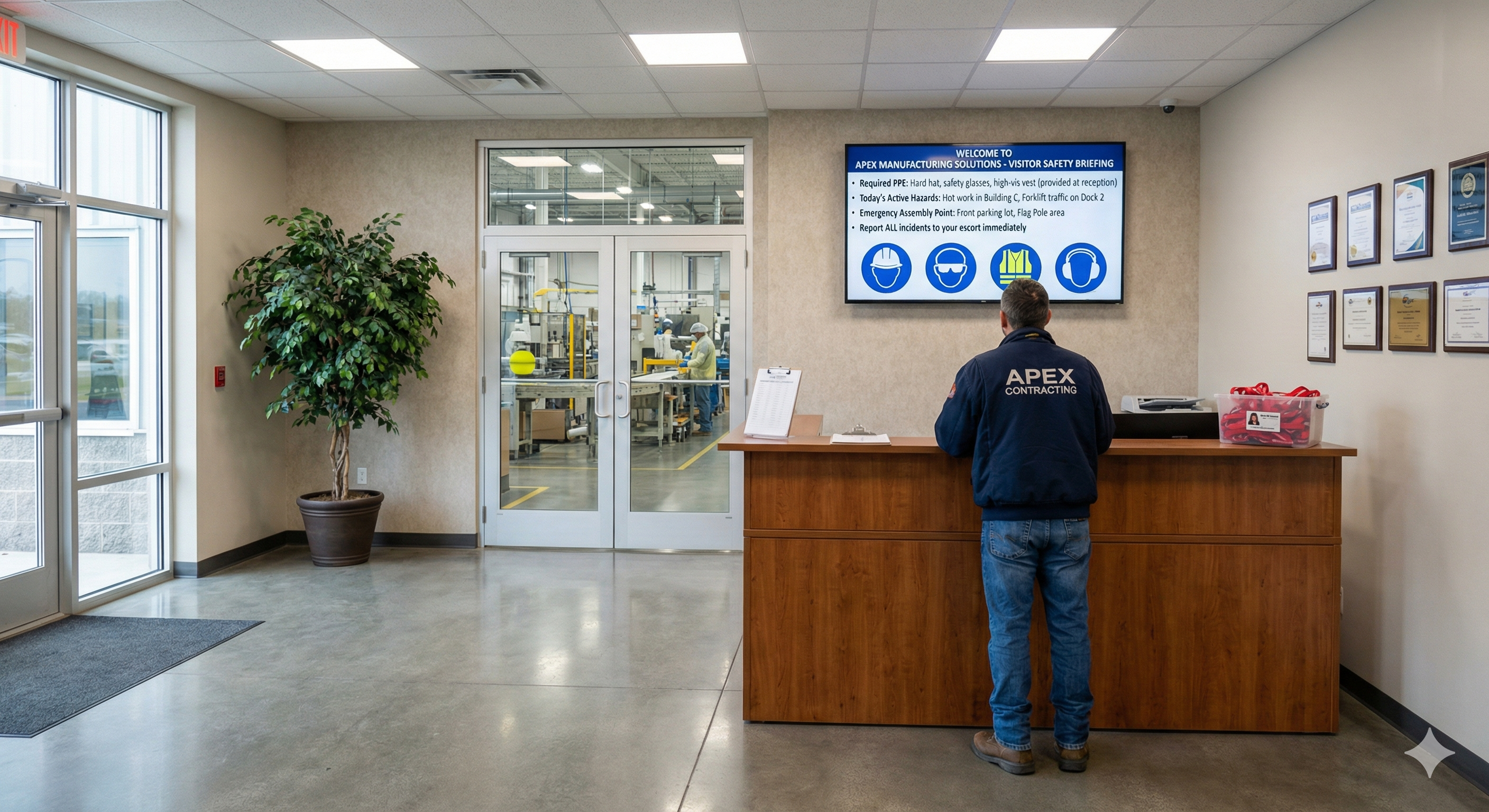
Digital signage is transforming how manufacturing plants onboard every person who walks through the door. Whether it is a maintenance contractor arriving for a scheduled shutdown, a supplier rep visiting procurement, or a customer touring the floor, every non-employee needs the same thing before stepping past the lobby: a clear, current understanding of the hazards they may encounter and the rules they must follow.
Most plants still handle that handoff with printed safety packets, laminated posters, and sign-in binders. Those tools worked well enough when facilities changed slowly. But today’s production environments shift by the hour. A confined-space entry permit issued this morning creates new restricted zones by lunch. A chemical delivery changes the PPE requirements in an entire wing. A line goes down for hot work and suddenly visitors need to know about welding flash hazards that did not exist yesterday. Static materials cannot keep up, and the gap between what a visitor reads in the lobby and what is actually happening on the floor creates real risk.
Screenly digital signage closes that gap by turning entry-point screens into live, centrally managed safety briefing stations that update the moment conditions change.
The paper problem is bigger than most plants realize
Walk into many manufacturing lobbies today and the check-in experience looks much the same as it did twenty years ago. A front desk attendant hands the visitor a clipboard, a pen, and a packet of printed pages covering general plant rules, emergency exits, PPE requirements, and a signature line acknowledging that the visitor has read and understood everything.
The problems with this approach go beyond inconvenience. Paper packets are printed in batches, which means the information they contain reflects conditions at the time of printing, not the time of arrival. If a new hazard has been introduced since the last print run, the visitor never hears about it. If a PPE requirement has changed for a specific zone, the old packet still lists the old rule. The visitor signs the acknowledgment in good faith, but the orientation they received is already out of date.
Sign-in binders create their own risks. Handwriting is often illegible. Entries can be skipped. There is no reliable way to verify that the person who signed actually watched the safety video or read the required material. And during an emergency, when plant managers need to know exactly who is on site and where they were headed, a paper log becomes a liability rather than an asset. Research from facility management firms suggests that a majority of manufacturing sites still lack a digital system to track visitors during emergencies, a gap that puts both visitors and the host facility in a difficult position.
For contractors, the stakes are even higher. OSHA requires host employers to establish procedures for exchanging information about site hazards and control measures with every contract employer whose workers will be on site. That exchange has to happen before work begins, and it has to be repeated whenever conditions change. A printed packet handed out once at the gate does not meet the spirit of that requirement, especially on multi-day jobs where hazards evolve as work progresses.
What visitors and contractors actually need at the door
Before anyone steps onto a production floor, they need a handful of things communicated clearly and accurately. They need to know which PPE is required and where to obtain it. They need to understand the specific hazards present in the areas they will be visiting, not just the general hazards that apply plant-wide. They need to know the emergency procedures, including alarm sounds, muster points, and whom to contact. And they need to understand any access restrictions that apply to their visit, whether those are related to active permits, cleanroom protocols, or restricted chemical storage areas.
The challenge is that much of this information changes frequently. A confined-space rescue plan may shift when new equipment is installed. A fire watch may be in effect for one shift but not the next. A section of the plant may be closed for fumigation on Tuesday but fully accessible on Wednesday. The visitor arriving Tuesday morning needs a very different briefing than the one arriving Wednesday afternoon, even if they are visiting the same area.
This is where digital displays at entry points fundamentally change the equation. A screen in the lobby or at the security checkpoint can show the current day’s hazard map, the specific PPE required for each zone the visitor will enter, the active emergency procedures, and any temporary restrictions. Because the content is managed centrally through Screenly’s cloud platform, an EHS coordinator can push an update to every entry-point screen in the facility within minutes of a condition change. No reprinting, no redistributing, no hoping that the front desk attendant remembers to swap out the old packet.
Turning the lobby into a live safety briefing station
Digital signage is replacing the sign-in binder and printed safety sheet in manufacturing lobbies. The shift is not just technological; it changes the way plants think about visitor orientation.
Instead of treating orientation as a one-time document hand-off, a screen-based approach treats it as an ongoing communication channel. When a visitor arrives, the lobby display can cycle through a short orientation sequence covering the information they need. That sequence can be tailored by visitor type. A contractor performing electrical work sees content about lockout/tagout procedures and arc flash boundaries. A vendor visiting the front office sees general plant rules and emergency exits. A customer on a guided tour sees an overview of PPE requirements and restricted areas.
The content itself can take many forms. Short video segments are effective for demonstrating PPE donning procedures or showing the locations of emergency equipment. Animated maps can highlight restricted zones and safe walking paths. Text-and-graphic slides can summarize the most critical rules in a format that is easy to read from across a waiting area. Because Screenly supports scheduling and playlists, plants can rotate through different content blocks throughout the day, ensuring that the orientation material stays relevant to the shift and conditions in effect at the time.
One of the most practical advantages of a screen-based system is consistency. Every visitor sees the same material, presented the same way, regardless of who is working the front desk that day. The briefing is not shortened because the lobby is busy. It is not skipped because the visitor is a frequent guest who claims to already know the rules. The screen runs every time, and the content is always the version that EHS approved most recently.
Keeping contractor orientations current across multi-day jobs
Manufacturing facilities are using digital signage to keep visitor and contractor orientations current in real time. This matters most for contractors who are on site for extended periods, sometimes weeks or months during a turnaround or capital project.
On a multi-day job, conditions change constantly. New permits are issued. Work fronts move. Adjacent areas may start or stop hazardous operations. The contractor who received a thorough orientation on day one may be working in an entirely different risk environment by day five. Traditional orientation programs struggle with this because they are designed as a single event, not an ongoing process.
Digital displays solve this by providing a persistent communication channel at contractor check-in points. Each morning, the screens can show an updated daily safety brief that covers new permits issued since the previous day, any changes to PPE requirements, schedule changes that affect access to specific areas, and weather-related precautions for outdoor work zones. Supervisors reviewing the day’s work scope can reference the same screens, ensuring that the information given to contract workers matches what the host plant’s own operations team is working from.
For plants that manage large contractor populations during shutdowns or turnarounds, this approach also reduces the administrative burden on the EHS team. Instead of printing and distributing updated briefing sheets to dozens of contractor supervisors every morning, the EHS coordinator updates the content in Screenly’s dashboard and every screen at every gate and check-in trailer shows the new information simultaneously. The update is logged, time-stamped, and auditable, which matters when regulators or insurers ask how safety information was communicated during a high-activity period.
PPE communication that matches the zone, not just the plant
One of the most common frustrations in visitor management is the mismatch between plant-wide PPE rules and zone-specific requirements. A manufacturing facility might have a baseline requirement of safety glasses, steel-toed boots, and high-visibility vests. But specific areas may require hearing protection, chemical-splash goggles, flame-resistant clothing, fall protection, or respiratory equipment depending on the processes running in those zones.
Paper-based orientations tend to either overwhelm the visitor with every possible requirement or simplify to the lowest common denominator, neither of which is ideal. Visitors who are told they need twelve different items of PPE for a brief office visit become frustrated. Visitors who are told they only need safety glasses may walk into an area where hearing protection is mandatory without realizing it.
Screen-based communication allows plants to present PPE requirements in context. A display at the entrance to a specific production area can show exactly what is required for that zone, updated in real time if conditions change. If a new chemical process starts up in a cell and requires additional respiratory protection, the screen outside that cell can be updated within minutes to reflect the new requirement. Visitors and contractors see what they need for the area they are about to enter, not a generic list that may or may not apply.
This zone-level specificity also supports compliance. When PPE requirements are displayed digitally and managed through a central platform, there is a clear record of what information was presented, when it was updated, and how long it was displayed. That documentation can be valuable during OSHA inspections, insurance audits, or incident investigations.
Emergency information that is never out of date
Emergency procedures are among the most important pieces of information a visitor receives during orientation, and among the most likely to be out of date on a printed sheet. Muster points change when construction projects block access routes. Alarm systems are updated. New emergency contacts replace old ones. A printed evacuation map from six months ago may show a path that is now blocked by a temporary structure.
Digital displays at entry points and throughout the facility can show the current evacuation routes, muster point assignments, and emergency contact numbers, updated instantly when anything changes. During an actual emergency, the same screens can switch to active alert mode, showing real-time instructions such as shelter-in-place directives, all-clear announcements, or specific guidance for the type of event in progress.
For visitors who are unfamiliar with the facility, this kind of dynamic communication can be the difference between a confused response and an effective one. They do not need to remember what was in the packet they signed thirty minutes ago. The information is on the screen in front of them, current and clear.
Connecting to your existing systems with Screenly Edge Apps
Many manufacturing plants already use dedicated software for visitor management, EHS compliance, or permit-to-work tracking. Screenly Edge Apps allow your team to connect entry-point displays directly to those existing platforms, creating a seamless flow of information from your systems of record to the screens your visitors see.
Edge Apps are built with standard web technologies, so your development team can create custom integrations using HTML, CSS, and JavaScript. If your visitor management system tracks who is checked in and what areas they are authorized to visit, an Edge App can pull that data and display a personalized welcome message along with the specific safety information for their destination. If your EHS platform tracks active permits and current hazard conditions, an Edge App can query that data and update the entry-point display automatically whenever a new permit is issued or a condition changes.
The integration possibilities extend to other plant systems as well. An Edge App could pull weather data to display heat stress warnings on days when outdoor work is planned. It could connect to your access control system to show wait times at the security checkpoint. It could retrieve the day’s production schedule to alert visitors about active processes in the areas they are visiting.
Because Edge Apps run locally on the Screenly Player, they remain responsive even if the network connection to your central systems is temporarily interrupted. The last known state continues to display until the connection is restored and new data is available. Screenly handles device management, security updates, and over-the-air deployments, freeing your team to focus on the integration logic that delivers value at the gate.
Ready-made Edge App examples are available on Screenly’s open-source Playground on GitHub, giving your developers a starting point they can adapt to your plant’s specific visitor management and safety communication workflows.
Making the shift from paper to screens
Moving from a paper-based visitor orientation program to a digital one does not require a massive infrastructure project. The core setup is straightforward: mount a commercial display at each entry point, connect a Screenly Player, and configure the content through Screenly’s cloud dashboard. The same platform that manages your lobby screens can manage displays at contractor check-in trailers, at the entrances to specific production areas, and at security checkpoints across multiple facilities.
The operational change is equally simple but more consequential. Instead of printing new packets whenever a rule changes, the EHS team updates a slide or a playlist in the dashboard and pushes it to every relevant screen at once. Instead of relying on the front desk to remember verbal additions to the standard briefing, the screen handles the communication consistently every time. Instead of digging through paper logs to find out who was on site last Tuesday, the digital system provides a time-stamped record of what information was displayed and when.
Plants that have made this transition report that the benefits go beyond compliance. Visitors comment that the orientation feels more professional and more respectful of their time. Contractors appreciate getting current information rather than outdated printed material. EHS teams spend less time on administrative tasks and more time on the risk assessment and communication work that actually improves safety outcomes.
Is your plant ready to upgrade visitor and contractor check-in?
If your lobby still relies on printed packets and sign-in binders to orient visitors, the gap between what those materials say and what is actually happening on your floor is likely growing. Download the free 2026-27 Digital Signage Readiness Checklist to evaluate where your facility stands and what it takes to move to real-time, screen-based visitor and contractor communication.