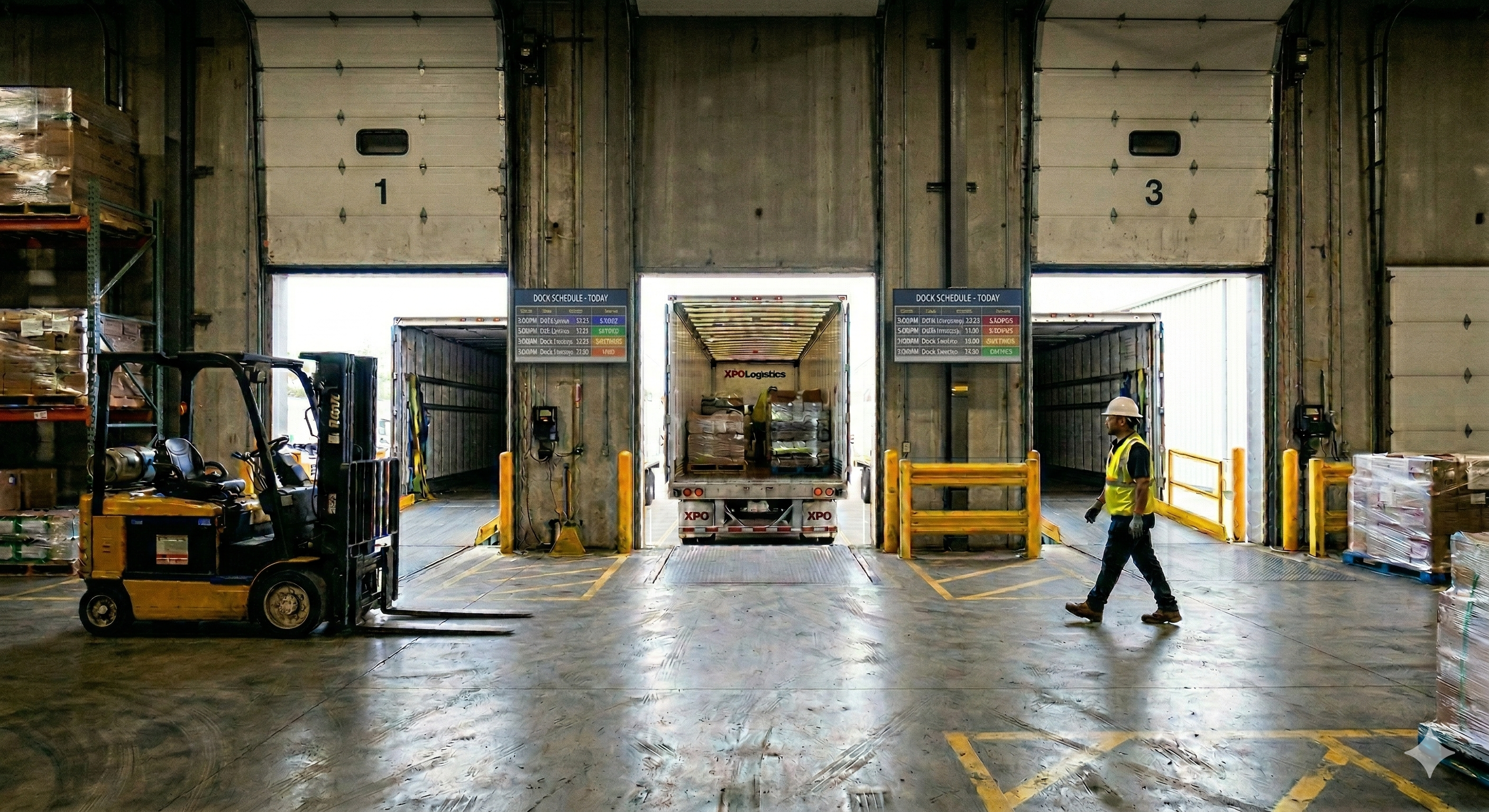
Every manufacturing warehouse has a version of the same story. A coordinator juggles dock assignments from a whiteboard and a spreadsheet. A carrier calls to confirm a pickup window. The coordinator checks the board, sees an opening at Door 6, and books it. Ten minutes later another carrier calls for the same window, and the coordinator, now fielding a question from a forklift driver, books Door 6 again. By mid-morning two trailers are backing toward the same bay, a third is idling in the yard with no assignment at all, and the detention clock is ticking.
Digital signage is bringing real-time visibility to manufacturing dock operations. By putting live dock schedules, assignment boards, and load status indicators on screens at every bay, in the yard, and in the shipping office, facilities can replace the patchwork of whiteboards, radio calls, and tribal knowledge with a single source of truth that everyone sees at the same time.
The hidden cost of running docks from memory
Dock scheduling looks simple on paper. Trucks arrive, get assigned a door, load or unload, and leave. In practice, a busy manufacturing warehouse might process dozens of inbound and outbound loads per shift across a handful of dock doors, and the coordination required to keep that flow moving is enormous.
Most facilities still manage this process through some combination of spreadsheets, dry-erase boards, phone calls, and the institutional memory of one or two experienced coordinators. The coordinator becomes the single point of failure. They know which carriers show up early, which doors have the right equipment for certain trailer types, and which shipments need to stage in a particular zone. None of that knowledge is visible to anyone else. When the coordinator is on break, out sick, or simply overwhelmed, the system breaks down.
The financial consequences add up quickly. Detention charges, which carriers levy when their trucks sit idle waiting for a door, can run from thirty to one hundred fifty dollars per hour depending on the carrier and region. One large food distribution operation that relied on spreadsheets to manage 115 trucks per day reported spending more than thirty-five thousand dollars a month in detention fees alone, not counting downstream production delays and overtime costs.
Manufacturing warehouses are using digital signage to take dock scheduling out of one person’s head. When every door’s current status, next appointment, and load progress is visible on a screen, coordinators still make decisions, but they are no longer the only people who know what is happening.
Why whiteboards and spreadsheets fail at the dock
The fundamental problem with analog scheduling tools is latency. A whiteboard in the shipping office reflects reality at the moment someone last updated it, which might have been five minutes ago or two hours ago. A shared spreadsheet is marginally better, but it still requires someone to open it, scroll to the right row, and interpret what they are seeing. Neither tool pushes information to the people who need it, when they need it.
This latency creates failure modes that are painfully familiar to anyone who has worked in warehouse logistics. Double-booking happens when two people make assignments without seeing each other’s changes. A coordinator promises Door 4 to an inbound raw materials shipment at 2:00 PM, then a supervisor redirects a finished goods load to the same door because the whiteboard still shows it as open.
Missed pickup windows are another chronic problem. An outbound shipment finishes staging, but the carrier does not know the load is ready because the status update is trapped in the coordinator’s radio or text message chain. The truck sits in the yard burning detention time, or worse, the carrier dispatches the truck to another shipper and the load misses its window entirely. For manufacturers shipping to customers with strict delivery appointments, a single missed window can cascade into chargebacks and expedited freight costs.
Then there is the information asymmetry between drivers and warehouse staff. A driver who pulls into the yard has almost no visibility into where they should go or how long they will wait. They check in at a guard shack, receive a verbal or handwritten door assignment, and navigate a yard that may have dozens of bays. If the assignment changes while they are in transit across the lot, they have no way of knowing until they arrive at the wrong door.
What a dock scheduling display actually shows
A well-designed dock scheduling display is not a generic dashboard. It is a purpose-built view that answers the specific questions different people at the dock are asking at any given moment.
For the shipping and receiving office, the primary display is a full schedule board showing every dock door, its current status (open, occupied, scheduled, blocked for maintenance), the carrier and load number assigned to each slot, and the appointment time. This view gives coordinators a complete picture of the day’s activity at a glance without opening a laptop or refreshing a spreadsheet. Color coding makes conflicts and delays immediately obvious. A door running behind schedule shows in amber. A completed load ready for departure shows in green.
For drivers and yard personnel, an outward-facing display near the guard shack or yard entrance shows a simplified version: just the door assignments and directional guidance. A driver pulling in can see that their load is assigned to Door 12 on the east side of the building, along with an estimated dock time. This eliminates the back-and-forth of check-in windows and radio calls, and it reduces the chance of a truck going to the wrong bay.
For warehouse floor staff, displays mounted near the dock doors show load-level detail: which trailer is at the door, what is being loaded or unloaded, how far along the process is, and what the next load in the queue looks like. Forklift operators and material handlers can plan their work without walking to the office to ask the coordinator what is coming next.
The power of the display is not in any single piece of information. It is in the fact that every audience sees the same data at the same time, drawn from the same source. When the coordinator updates a door assignment, the change appears on every screen simultaneously. There is no telephone game, no version of the schedule that is fifteen minutes behind.
How live displays reduce detention and demurrage
Digital signage at loading docks is helping manufacturers eliminate missed windows and detention charges. The mechanism is straightforward: when status information flows in real time, every actor in the dock process can make better decisions faster.
Consider a common scenario. A carrier’s truck arrives fifteen minutes early for a 10:00 AM appointment. In a whiteboard-driven operation, the driver checks in, sits in the yard, and waits. The coordinator may not realize the truck is on-site until someone radios in. If the previous load at the assigned door finishes at 9:50, the door sits empty for ten minutes while information works its way through the human chain.
With a live display, the sequence changes. The guard shack screen shows the early arrival. The coordinator sees that Door 8 is about to clear and reassigns the early truck immediately. The driver sees the updated assignment on the yard display and pulls to the correct door. Idle time drops from thirty or forty minutes to a handful. Multiply that across dozens of loads per day and the detention savings alone can justify the cost of the deployment.
Demurrage reduction follows a similar pattern. When outbound loads finish staging, a live display communicates readiness to everyone involved. Loads spend less time sitting in staged status waiting for someone to close the communication loop.
Beyond direct cost savings, the operational improvements compound. Faster door turns mean higher throughput from the same number of bays. Better visibility into upcoming appointments lets supervisors plan labor more effectively, pulling material handlers to the dock before a truck arrives rather than scrambling after it backs in. And carriers who consistently experience smooth dock operations at a facility are more likely to offer favorable rates and priority capacity during tight freight markets.
Connecting displays to your scheduling systems with Screenly Edge Apps
The dock displays described above are most valuable when they are connected directly to the systems that manage scheduling and yard operations. Static content that someone manually updates is only marginally better than a whiteboard. The real transformation happens when screens update themselves based on live data.
Screenly Edge Apps make this connection possible. Edge Apps is a developer framework that lets your team build custom signage applications using standard web technologies like HTML, CSS, and JavaScript. The apps run directly on the Screenly Player hardware, which means they are fast, reliable, and continue to function even if the network has a momentary interruption.
For dock scheduling, an Edge App can pull data from your warehouse management system, transportation management system, or dedicated dock scheduling platform through their APIs. If your WMS tracks inbound purchase orders and assigns dock doors, the Edge App can query that data and render a live door assignment board on screen. If your TMS manages carrier appointments and provides estimated arrival times, the app can display that schedule and update it as ETAs change throughout the day.
Yard management systems are another natural integration point. Platforms that track trailer positions, gate check-ins, and dock door availability can feed data directly to screens placed at strategic points around the facility. A display at the guard shack shows incoming drivers where to go. A display inside the warehouse shows dock supervisors which trailers are in the yard and which doors are available.
The flexibility of Edge Apps means your team can design displays that fit the way your operation actually works rather than forcing your workflow into a generic template. If your facility has separate inbound and outbound docks with different scheduling rules, you can build distinct layouts for each. If certain doors are reserved for hazmat loads or temperature-controlled trailers, the display can reflect those constraints visually. If your operation runs three shifts with different staffing levels, the app can adjust what it shows based on time of day.
Because Edge Apps run locally on the player, they are resilient to connectivity issues that would take down a cloud-only dashboard. The player caches data and continues to display the last known state if the network drops, which matters in warehouse environments where Wi-Fi coverage near dock doors can be spotty. Screenly handles device management, security updates, and over-the-air deployments centrally, so your IT team does not need to walk the floor to push changes to individual screens. The open-source Playground on GitHub includes Edge App examples your team can use as starting points.
Placement and hardware considerations for dock environments
Dock areas present specific challenges for display hardware. Screens need to survive temperature swings, dust, and the constant vibration of heavy equipment. Placement also matters more than in a typical office setting because the audience is often moving.
For the shipping office, a standard commercial-grade display in the 55-inch to 75-inch range gives coordinators a full view of the schedule from across the room. For outward-facing yard displays near guard shacks or yard entrances, high-brightness panels rated at 2,500 nits or more ensure readability in direct sunlight. An outdoor-rated enclosure protects against rain, snow, and temperature extremes. For dock door displays mounted inside the warehouse near open bay doors, commercial-grade screens with a protective housing handle the drafts, dust, and temperature fluctuations common to active loading areas. Mounting eight to ten feet high keeps screens readable from a forklift cab and out of the path of material handling equipment.
In every location, the Screenly Player connects via HDMI and handles all content rendering. Because the player is a small, solid-state device with no moving parts, it is well suited to the rough environments found around docks and warehouse bays.
Building the case for dock signage in your facility
The business case for dock scheduling displays rests on three pillars: cost avoidance, throughput improvement, and operational resilience.
Cost avoidance is the easiest to quantify. If your facility is currently paying detention charges, even modest ones, you can calculate the reduction you would expect from faster door turns and better communication with carriers. Facilities that move from manual scheduling to real-time visibility commonly see detention costs drop by fifty percent or more within the first few months.
Throughput improvement is harder to measure precisely but often more valuable. Every minute a dock door sits empty between loads is capacity you cannot get back. When live displays reduce the gap between loads by giving warehouse staff advance notice of what is coming next, the same number of doors can handle more volume per shift. For manufacturers operating near capacity, this can delay or eliminate the need for physical dock expansion.
Operational resilience is the least tangible benefit but arguably the most important. A facility that depends on one coordinator’s memory to keep docks moving is one sick day away from chaos. When the schedule, the assignments, and the status updates all live on screens that everyone can see, the operation absorbs personnel changes, volume spikes, and unexpected disruptions without grinding to a halt. Many facilities begin with a single screen in the shipping office, then expand to yard-facing and dock door displays as they see the value of real-time visibility. Screenly’s remote management makes it straightforward to add screens across locations without requiring on-site IT support for each new display.
Get started with your dock scheduling displays
If your facility is still coordinating docks through whiteboards, spreadsheets, or radio calls, the gap between where you are and where you could be is smaller than you might think. A single screen showing live dock assignments can change the way your team communicates, and the operational gains tend to build from there.
Download the free 2026-27 Digital Signage Readiness Checklist to evaluate your facility’s current scheduling setup, identify the integrations that would deliver the most value, and build a plan for getting live displays on your docks.