ScreenlyOS
The secure, single-purpose operating system for digital signage. ScreenlyOS runs Screenly and nothing else, so one vendor is answerable for the whole device, and a screen keeps running for years with nobody nearby to look after it.

Three layers. One vendor.
Digital signage is three layers, and most vendors own one of them. We build all three and release them as a single product, which is the only arrangement under which anyone can be answerable for the whole device.
Content
Authoring, scheduling, publishing
Usually owned by The signage software vendor
Device management
Monitoring, control, provisioning, diagnostics
Usually owned by A separate vendor, or nobody
Operating system and device
Boot, drivers, patching, hardening, lifecycle
Usually owned by The OS vendor or the display manufacturer
Each of those parties does its part competently. The gap is not in any of their work, it is in the space between them, and the operating system is where that space sits. An operating system nobody is answerable for still needs patching, imaging, and a site visit every time one of them stops behaving. None of that appears in a signage budget, and all of it appears in somebody's week.
A secure, single-purpose appliance
Most digital signage is a program installed onto a general-purpose system, a Windows PC or an Android device, sharing the machine with everything else it was meant to do. ScreenlyOS turns that around: it is the operating system, and the device exists to do one thing.
Locked down by default
Anything unnecessary is stripped out. No open ports, no way to log in remotely, and updates that are rejected outright if their signature doesn't check out.
Updates for the long haul
A screen can stay on a wall for years, long after a device maker's support window would otherwise close. Because the OS is ours, keeping it current stays our job.
Managed as one system
The operating system and the playback software are built together, update together, and are tested as one, so the whole device stays manageable from the cloud.
Built for enterprise deployments
The pillars above show up as concrete capabilities, built into the device itself.
Signed OTA updates
The OS and playback software update together over the air, transactional and cryptographically signed, with automatic rollback if an update fails.
802.1x network support
Connect to 802.1x authenticated Wi-Fi or wired networks, including static IPs, straight from the on-screen setup wizard.
mTLS-protected web assets
Players can present a device certificate when loading web content, so your server can verify the request came from an authorized device.
Workspace-wide Tailscale
Connect once from workspace settings and every player joins your Tailnet automatically, no per-device setup.
Offline content caching
Content is cached locally on the device, so playback continues and the screen never goes black if the connection drops.
Offline schedule caching
The schedule is cached on the device too, so playlists still switch on time, day-parting and all, even if the connection drops.
Apps run on the device
ScreenlyOS renders apps locally on the device itself rather than as a server-side screenshot, so they stay dynamic and interactive and keep working even when the connection drops.
Browse the app store >Independently certified
Screenly is certified to SOC 2 Type II and ISO 27001, so the controls behind the platform have been audited rather than asserted.
TPM-backed credential storage
On devices with a TPM, like the Screenly Player Max, the credentials a screen uses to reach a protected dashboard or an internal service are held in the chip rather than in ordinary storage, tied to that device.
Remote reboot & diagnostics
Reboot a frozen screen and check CPU, memory, and network health, all from the dashboard, without a site visit.
Remote diagnostic screenshots
Pull a screenshot of what's actually on screen to troubleshoot remotely, or switch a screen to Privacy Mode to stop screenshots of it from being captured at all.
Managed from one dashboard
Every capability here is controlled from the same cloud dashboard used to schedule and publish content.
What actually forces a hardware refresh
Every vendor will tell you that you can keep your hardware. Almost none of them actually saves it, because the thing that forces the refresh is not the signage software. It is the operating system on the box.
Swap the signage software
Nothing about the machine's lifecycle has changed.
When its operating system reaches the end of its support window, and the next version will not install on its processor, the hardware still goes in the bin. The signage software was never what was holding it back.
Replace the operating system
The machine gets a new support window.
This is the version of hardware reuse that actually extends the life of the device. It is a claim about architecture rather than intent, and it is one you can check.
ScreenlyOS runs on our own players, on a Raspberry Pi, on Scala players, and on Sharp displays that ship with it preloaded, so a fleet can move toward whatever suits each site without the software changing underneath it. It can also run on other amd64 hardware you already own, though that is not a self-serve route: each model has to be booted and confirmed before we list it as supported, and we will not claim a model works until someone has tested one.
Four ways to get ScreenlyOS
They differ in how much is already done for you before the device is in your hands. The result is the same: a device running the whole Screenly stack.
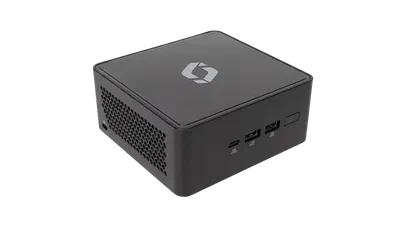
On Screenly hardware
Our own players come with ScreenlyOS already on them, tuned together as one product. The most hands-off route there is.

On a Sharp display
Sharp offers ScreenlyOS preloaded on its large-format displays, with a Raspberry Pi Compute Module built right into the screen.
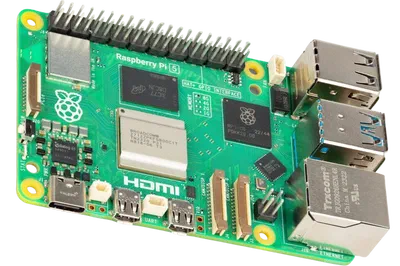
On your own Raspberry Pi
We provide an image for it, so a standard Pi becomes a full ScreenlyOS device. The fastest way to try it before deciding on hardware.
On a Scala player you already own
Scala players are standard x86 hardware, so ScreenlyOS installs onto them directly. A fleet already mounted behind displays keeps working under Screenly instead of being replaced.
Related tools
Free tools for setting up and installing ScreenlyOS.
Network Config Generator
Generate a network.yaml file to configure Wi-Fi and network settings for a headless Screenly Player or DIY Raspberry Pi player.
Generate a config fileRaspberry Pi Imager
The official Raspberry Pi tool for writing the ScreenlyOS image to an SD card or USB drive.
Get Raspberry Pi ImagerWant the full explanation of how ScreenlyOS works? Read the ScreenlyOS docs.
Display your best content with Screenly digital signs.
Get started today quickly and easily with Screenly's secure, enterprise-grade digital signage.
