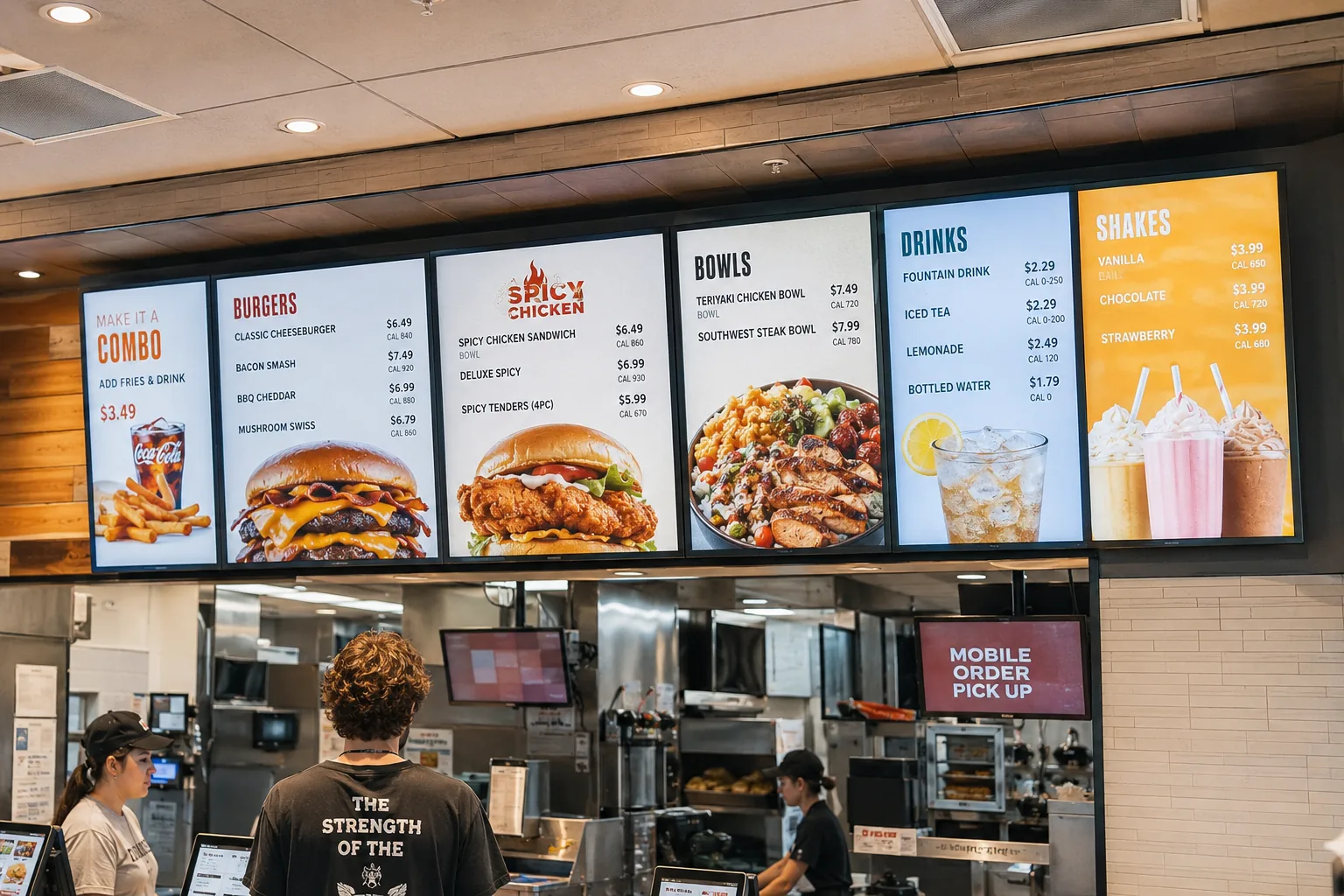
Digital menu boards replace printed menus, letterboards, and backlit transparencies with screens you control remotely. Change a price in seconds, switch from the breakfast menu to lunch automatically, and keep every location on brand without printing a thing.
This guide covers everything you need to launch digital menu boards: the hardware and software involved, what it all costs, how to design menus people can actually read, and what works best for quick service restaurants, cafes, cafeterias, and bars.
What is a digital menu board?
A digital menu board is a screen, a TV or commercial display, that shows your menu instead of a printed sign. Behind the screen sits a small media player and cloud-based software that lets you update content from anywhere.
You may also see them called electronic menu boards, digital menu displays, or menu screens. The names vary, but the setup is the same: a display, a player, and software to manage what plays.
The key difference from a printed menu is control. A static menu is fixed until you reprint it. A digital menu board updates the moment you push a change, across one screen or a hundred.
Why switch to digital menu boards?
Menu boards are one of the highest-return uses of digital signage, and the reasons are practical rather than flashy:
Update prices and items instantly. When ingredient costs move or an item sells out, you change the menu from your laptop. No reprints, no taping paper over prices, no waiting on a print vendor. For multi-location operators, one update reaches every store at once.
Schedule menus by daypart. Set your breakfast menu to switch to lunch at 11:00 sharp, every day, automatically. Weekend brunch, happy hour, and limited-time offers can all be scheduled once and left to run themselves.
Sell more of what you want to sell. Digital menu boards let you feature high-margin items, combos, and specials prominently, and rotate promotions without redesigning the whole board. Motion and imagery draw attention in a way static print doesn’t.
Cut recurring print costs. Printed menu boards cost money every time anything changes. A digital menu board is a one-time hardware cost plus a modest software subscription, and after that, changes are free forever.
Keep every location consistent. Franchise and multi-site operators manage all screens from one dashboard, so branding, pricing, and promotions stay uniform without depending on each store to swap signs correctly.
What you need to run a digital menu board
Every digital menu board setup has three parts: a screen, a media player, and software. Here’s how to think about each.
The screen
For most indoor menu boards, a standard consumer TV works fine. If your screens run long hours in bright environments, such as behind a QSR counter under strong lighting or in a window, a commercial-grade display is worth considering. Commercial displays are rated for continuous operation and higher brightness, and they typically carry warranties that cover signage use. Our buying guide to digital signage displays covers the full decision.
Two things to decide up front:
- Orientation. Menu boards work in both landscape and portrait. Screenly supports both orientations, so you can match the screen to your wall space and menu layout.
- Resolution. 1080p is sufficient for most menu boards viewed from ordering distance. 4K makes sense for large screens or close viewing.
The media player
The media player is the small device that renders your menu on the screen. This is the component that determines whether your menu boards run reliably at 7pm on a Friday, so it’s worth choosing carefully.
You have two routes with Screenly:
- Dedicated players. The Screenly Player and Screenly Player Max Mk3 are pre-configured, remotely managed devices built for exactly this job. They receive automatic security updates, are monitored for health, and are designed to run 24/7. One player drives one screen.
- Hardware you already own. Screenly Anywhere runs on smart TVs (including Samsung Tizen), Android and Android TV devices, ChromeOS, the Amazon Signage Stick, and anything with a modern browser. If your location already has a smart TV behind the counter, you can turn it into a digital menu board without buying new hardware.
A note on reliability: a menu board that crashes or shows a blank screen during the lunch rush costs you real money. Whatever platform you choose, look for automatic recovery, health monitoring, and content caching so menus keep playing even if the internet connection drops.
The software
Digital menu board software is where you build playlists, schedule dayparts, and manage screens. When you’re comparing options, the features that matter most for menu boards are:
- Remote management. Update any screen, in any location, from one dashboard. No USB sticks, no ladders.
- Scheduling. Daypart switching (breakfast to lunch to dinner) and date-based scheduling for promotions.
- Playlists and zones. Rotate promotional content alongside the core menu.
- Offline playback. Content should be cached on the device so menus keep displaying through internet outages.
- Multi-user access. Let marketing update promotions while managers update prices, with appropriate permissions for each.
- Security. Menu boards live on your business network, and screens are an attack surface. This is why Screenly is ISO 27001 and SOC 2 Type II certified, built on a zero-trust architecture: no default credentials, no open ports, and automatic security updates.
- Integrations and APIs. If you want menus to update from a spreadsheet, your POS data, or inventory levels, an API lets you automate it. For example, an item can be hidden automatically when it sells out.
How much do digital menu boards cost?
Digital menu board pricing comes down to three components:
Screens. A quality consumer TV runs roughly $200 to $500 depending on size. Commercial-grade displays typically start around $500 and go up with size and brightness. If you’re mounting screens, budget for mounts and installation as well.
Media players. The Screenly Player is $219 and the Screenly Player Max Mk3 is $699, per screen. If you use Screenly Anywhere on a smart TV or device you already own, your player hardware cost is zero.
Software. Digital signage software is priced per screen per month. See Screenly’s pricing for current plans, and our full cost breakdown for every component.
As a realistic example, a single-screen menu board using a mid-range TV and a Screenly Player lands in the neighborhood of $500 to $700 in one-time hardware, plus the software subscription. A three-screen QSR menu wall scales that hardware cost linearly, but the software and management overhead barely grow. One dashboard runs all three.
When comparing costs, factor in the ongoing side too: printed menu boards carry recurring design and print costs with every menu change, and cheap signage hardware carries hidden costs in failures, manual updates, and staff time. Reliability is a cost line, even if it doesn’t appear on an invoice.
Digital menu board design best practices
A menu board’s job is to be read quickly by someone standing in line. Design for that:
Make it legible from ordering distance. Text should be readable from where customers actually stand, which is often 6 to 15 feet away. When in doubt, go bigger. High contrast between text and background matters more than decoration.
Structure the menu the way people order. Group items into clear categories, lead with your most popular or highest-margin sections, and keep item names and prices visually paired so nobody has to hunt.
Use motion sparingly. A subtly animated hero item draws the eye; a menu where everything moves is unreadable. Animate promotions and keep the core menu stable.
Design for your daypart schedule. Build separate layouts for breakfast, lunch, and dinner rather than cramming everything onto one board. Scheduling handles the switching.
Keep photos honest and appetizing. A few great food photos outperform many mediocre ones. Bad food photography actively costs you sales.
For a deeper treatment of layout, contrast, and content design, see Screenly’s guide to digital signage content design.
Digital menu board templates
You don’t need a designer to get started. Many teams build menu boards in tools they already know. Screenly’s Google Slides tutorial shows how to design a menu in Slides and display it on your screens, which also makes edits as easy as editing the deck. Canva and similar tools offer menu board templates that export cleanly as images or web content, and Screenly Apps can add live elements like clocks and weather alongside your menu. For ready-made layouts beyond menus, our library of templates covers welcome screens, schedules, and more.
Digital menu boards by venue
The fundamentals are the same everywhere, but the details shift by setting.
Fast food and QSR menu boards
Speed is everything in quick service. Menu boards above the counter should get customers to a decision before they reach the register: clear combos, visible prices, and scheduled dayparts that switch automatically. Multi-screen menu walls are standard here, with one player per screen, managed as a group. For a full walkthrough, see our guide to QSR digital signage deployment.
Cafe and coffee shop menu boards
Cafe menu boards balance function with atmosphere. Portrait screens behind the bar suit drink lists well, and the ability to update seasonal menus instantly is a genuine operational win. Pumpkin spice season arrives exactly on schedule. More ideas in our coffee shop digital signage guide.
Cafeteria menu boards
School, hospital, and corporate cafeterias have a distinct challenge: menus that change daily or weekly, often managed centrally across multiple sites. Digital cafeteria menu boards let a food service team publish the week’s menu to every location from one dashboard, and update it when the kitchen makes a substitution. For institutional settings, Screenly’s enterprise features (SSO, granular access control, audit logs) let facilities teams delegate menu updates safely without handing over the keys to the whole system. Campus cafeterias usually run alongside the rest of a school digital signage deployment, sharing the same dashboard.
Bars and breweries
Tap lists change constantly, which makes them a perfect fit for digital menu boards. When a keg kicks, remove the beer from the board in seconds from behind the bar. Rotating screens can cycle between the tap list, food menu, and event promotions.
Menu boards are usually the first screen a food service business deploys, but rarely the last. Promotions, queue displays, and back-of-house dashboards often follow. If you’re thinking beyond menus, our restaurant digital signage overview covers the broader picture.
How to set up a digital menu board with Screenly
- Create your Screenly account. Start with a free trial.
- Choose your player. Order a Screenly Player or Player Max Mk3, or use Screenly Anywhere on a smart TV or device you already own.
- Connect the player to your screen via HDMI and pair it with your account. Setup takes minutes, not an afternoon.
- Upload your menu content. Images, videos, Google Slides, live web pages, or Screenly Apps.
- Build playlists and schedules. Assign menus to screens, set your dayparts, and let the schedule run.
From there, every update, whether it’s a price change, a new special, or a seasonal menu, is a few clicks from wherever you are.
Frequently asked questions
Can I use a regular TV as a digital menu board?
Yes. Any TV with an HDMI port works with a Screenly Player, and many smart TVs can run Screenly Anywhere directly. For screens running long hours in bright environments, commercial displays are more durable, but a consumer TV is a fine starting point.
How do I make a digital menu for a TV?
Design your menu as an image, a Google Slides deck, or a web page, upload it to your Screenly account, and assign it to your screen. The Google Slides route is the fastest for most teams: design once, and future edits publish automatically.
How much does digital menu board software cost?
Software is priced per screen per month. See Screenly’s pricing for current plans. Hardware is a one-time cost: $219 to $699 for a dedicated Screenly player, or nothing if you use hardware you already own.
Do digital menu boards work if the internet goes down?
With Screenly, yes. Content is cached on the player, so your menus keep displaying through connection drops. Updates sync when the connection returns.
Can I schedule different menus for different times of day?
Yes. Daypart scheduling is core to Screenly. Set breakfast, lunch, and dinner menus once and they switch automatically, every day.
Can menu boards run in portrait orientation?
Yes. Screenly supports portrait and landscape, so you can match your screens to your space and menu layout.
Ready to launch your digital menu boards?
Screenly powers menu boards from single-location cafes to multi-site enterprise deployments, with the security, reliability, and remote management to keep them running every single day.
